
Last updated on
Nov 6, 2026
FL Provider Enrollment Application 2012-2026 free printable template
pdfFiller is not affiliated with any government organization

Fill out
Complete the form online in a simple drag-and-drop editor.

eSign
Add your legally binding signature or send the form for signing.

Share
Share the form via a link, letting anyone fill it out from any device.

Export
Download, print, email, or move the form to your cloud storage.
Why pdfFiller is the best tool for your documents and forms


End-to-end document management
From editing and signing to collaboration and tracking, pdfFiller has everything you need to get your documents done quickly and efficiently.
Accessible from anywhere
pdfFiller is fully cloud-based. This means you can edit, sign, and share documents from anywhere using your computer, smartphone, or tablet.
Secure and compliant
pdfFiller lets you securely manage documents following global laws like ESIGN, CCPA, and GDPR. It's also HIPAA and SOC 2 compliant.
What is FL Provider Enrollment Application
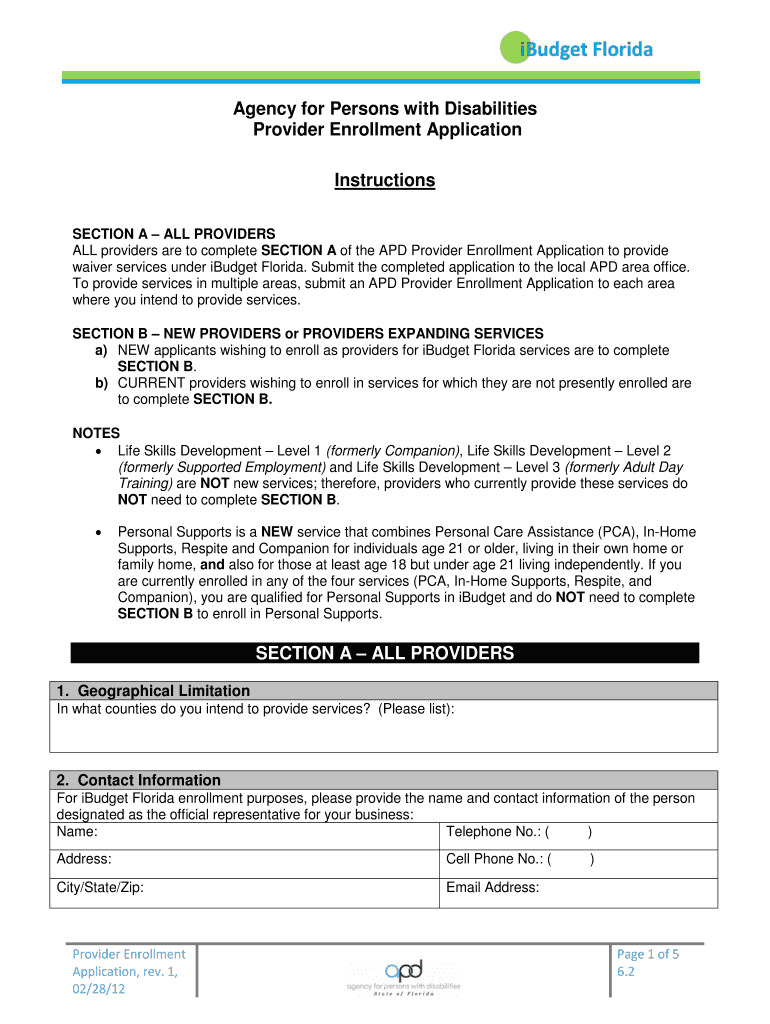
The APD Provider Enrollment Application is a healthcare form used by providers to enroll in the iBudget Florida waiver program, delivering essential services to persons with disabilities.
pdfFiller scores top ratings on review platforms




Extremely easy to use, quick to download and satisfies needs
I really enjoy how user friendly the program is. If I had any complaints, it would be that I have to change the size of the font if I am updating a previous document that I edit.
Who needs FL Provider Enrollment Application?
Explore how professionals across industries use pdfFiller.

FL Provider Enrollment Application is needed by:
-
Healthcare providers offering services to individuals with disabilities
-
New providers seeking to enroll in the iBudget Florida waiver program
-
Existing providers expanding their service offerings
-
Organizations supplying waiver services in Florida
-
Administrative staff managing provider enrollment
-
Professionals involved in disability services in Florida
Comprehensive Guide to FL Provider Enrollment Application
What is the APD Provider Enrollment Application?
The APD Provider Enrollment Application is a crucial form for healthcare providers looking to enroll in the iBudget Florida waiver program, which offers essential services to persons with disabilities. This application enables providers to participate in the Florida waiver services and to align with the requirements set forth by the Agency for Persons with Disabilities (APD).
The application is structured into multiple sections, primarily Sections A and B, which gather necessary information regarding provider operational details and service offerings. Accurately completing this form is vital for healthcare providers, as it ensures their eligibility to deliver essential disability services.
Purpose and Benefits of the APD Provider Enrollment Application
The APD Provider Enrollment Application serves as a gateway for providers to access the invaluable iBudget Florida waiver program, fostering enhanced support for individuals with disabilities. By enrolling successfully, providers can expand their service offerings, thus benefiting both their organization and the individuals they serve.
-
Enrolling in the program opens access to financial resources for service provision.
-
The APD connection simplifies how individuals access disability services, leading to better outcomes.
-
A correct application submission can prevent unnecessary delays in receiving approval and service initiation.
Who Needs the APD Provider Enrollment Application?
This application is essential for several types of providers. New providers who wish to establish services and existing providers looking to expand their offerings must complete this application. Understanding who needs this form ensures that the appropriate healthcare professionals engage with the enrollment process effectively.
-
New providers entering the healthcare service landscape.
-
Providers currently offering services who want to expand their service offerings.
-
Organizations aiming to meet specific service categories identified by APD.
Eligibility Criteria for the APD Provider Enrollment Application
Providers interested in completing the APD Provider Enrollment Application must meet certain eligibility requirements to enroll in the iBudget program. Eligibility encompasses geographic considerations and timeliness in application submission, which is critical based on the available service needs.
-
Providers must maintain active licensing or certification in Florida.
-
Geographic limitations may restrict applicability based on service coverage areas.
-
Timely submission is vital, particularly when responding to urgent service demands.
Step-by-Step Guide on How to Fill Out the APD Provider Enrollment Application Online
Filling out the APD Provider Enrollment Application requires careful attention to detail, specifically in Sections A and B. It is crucial that every step is followed accurately to ensure a smooth submission process.
-
Access the form through the designated online portal.
-
Complete Section A with basic provider information such as contact details.
-
Fill out Section B if you are a new provider or expanding services, indicating specific service capabilities.
-
Review all entries for completeness and correctness, ensuring all required fields are filled.
-
Submit the form electronically or prepare it for in-person submission.
Common Errors and How to Avoid Them When Submitting Your APD Provider Enrollment Application
Applicants often encounter common challenges when completing and submitting the APD Provider Enrollment Application. Awareness of these errors can significantly expedite approval processes.
-
Incomplete information in required fields can lead to application rejection.
-
Missing or inaccurate signatures and dates create processing delays.
-
Failure to review the form before submission often results in avoidable mistakes.
Submission Methods for the APD Provider Enrollment Application
Providers have several options for submitting their completed APD Provider Enrollment Application. Understanding these methods is essential for ensuring timely processing.
-
Submit the application in person at local APD area offices.
-
Email the completed form directly to the designated APD office.
-
Be aware of submission deadlines to avoid any complications with your application.
After Submission: What Happens Next?
Once your APD Provider Enrollment Application is submitted, there are specific processes that will follow. Being informed about these will help manage expectations during the waiting period.
-
Expect processing times that may vary depending on the volume of submissions.
-
Applicants can typically track the status of their application using established APD communication channels.
-
Understanding common reasons for application rejection can aid in preventing future issues.
How pdfFiller Can Help You with the APD Provider Enrollment Application
pdfFiller enhances the process of completing the APD Provider Enrollment Application. With numerous features designed for efficiency and compliance, pdfFiller is an invaluable tool for providers.
-
Easy functionalities for editing and filling out PDF forms streamline the application process.
-
eSigning capabilities ensure that sensitive documents are handled securely and efficiently.
-
Robust security measures protect personal and healthcare information throughout the completion process.
Final Thoughts on the APD Provider Enrollment Application
Completing the APD Provider Enrollment Application accurately is crucial for providers looking to deliver disability services. Utilizing pdfFiller can significantly streamline form management, making the process more efficient.
Providers are encouraged to start their application today, leveraging the tools available through pdfFiller for a seamless experience.
How to fill out the FL Provider Enrollment Application
-
1.To start, access pdfFiller and locate the APD Provider Enrollment Application from the templates section or upload the PDF directly if you have it saved.
-
2.Once you open the form, familiarize yourself with its two sections; Section A is for all providers, while Section B is designated for new or expanding providers.
-
3.Begin filling out Section A by entering your geographical limitations and contact details in the designated fields marked with clear prompts.
-
4.For new providers, ensure you complete Section B by detailing your provider designation and any service enrollment preferences.
-
5.Utilize pdfFiller's interactive fields to check boxes and fill in text. You can click on each field to make entering information seamless.
-
6.Gather any necessary supporting documents, like service qualifications, before starting to ensure a complete application.
-
7.After completing the form, review all entries carefully to correct any potential errors or omissions.
-
8.Follow the prompts in pdfFiller to finalize the form, ensuring all signature fields are filled out adequately.
-
9.Once satisfied with the information, use the save option in pdfFiller to download the completed form to your device or choose to submit it directly to the local APD area office through their submission options.

Who is eligible to fill out the APD Provider Enrollment Application?
The application is intended for healthcare providers, including new providers and those expanding their services to support individuals with disabilities in Florida.
What are the submission methods for the APD Provider Enrollment Application?
The completed application must be submitted to the local APD area office. Ensure to follow any submission guidelines provided by your local office.
Are there any supporting documents required to complete the application?
Yes, providers need to gather essential supporting documents, including proof of service qualifications, before submitting the APD Provider Enrollment Application.
What are common mistakes to avoid when filling out the application?
Common mistakes include missing signature fields, not entering complete contact details, and failing to review the eligibility criteria specific to the iBudget program.
How long does it take to process the APD Provider Enrollment Application?
Processing times may vary, but typically it can take a few weeks. It's advisable to submit the application well ahead of your intended service start date.
Is notarization required for the APD Provider Enrollment Application?
No, the APD Provider Enrollment Application does not require notarizing. However, all signatures must be verified within the form.
Can I edit the form after submitting it through pdfFiller?
Once submitted, make sure all information is correct. If needed, you can contact your local APD area office for post-submission modifications.
Related Content
Related Forms
Related Catalogs
Get the latest insights from our blog


If you believe that this page should be taken down, please follow our DMCA take down process
here
.
This form may include fields for payment information. Data entered in these fields is not covered by PCI DSS compliance.